


Most web hosting companies with cPanel offer a feature called “domain redirects”. Using this feature, you can point any domain to any other domain (or a non-www version of a website to the www version and vice versa).
In this tutorial, I’ll explain how you can use the HostGator Domain Redirect feature to do a 301 (permanent) redirection of any domain from the HostGator cPanel.
If you don’t know about HostGator, I suggest you check out ShoutMeLoud’s HostGator review.
HostGator Domain Redirect Using cPanel
If you want to give a 301 redirect but are unable to do this using the .htaccess file, then you can do the redirect straight from your hosting control panel.
With the hosting control panel, you can redirect any domain to any other domain. For example, if you own the .org version of your .com name, you can redirect the .org domain to the .com website (or vice versa). Or maybe you want to change the domain of your site. You can redirect the old domain to the new domain so you don’t lose any traffic.
Or you can redirect a naked domain (without “www.”) to the “www.” version.
Here is a simple and easy to understand tutorial on how to redirect a domain using the HostGator cPanel.
Just so you know, HostGator will soon be launching the HostGator domain registrar which will allow you to use HostGator’s new cPanel to manage domain redirections.
Redirecting a naked domain to “www.”
Warning: Use this method only if your preferred domain is with “www.”. If your preferred domain is a naked domain, doing this will cause an infinite loop; i.e., your domain will be continuously redirecting between “www.” and naked.
- First, log in to your HostGator hosting account.
- Now go to the tab “Domains” and click on “Redirects”.
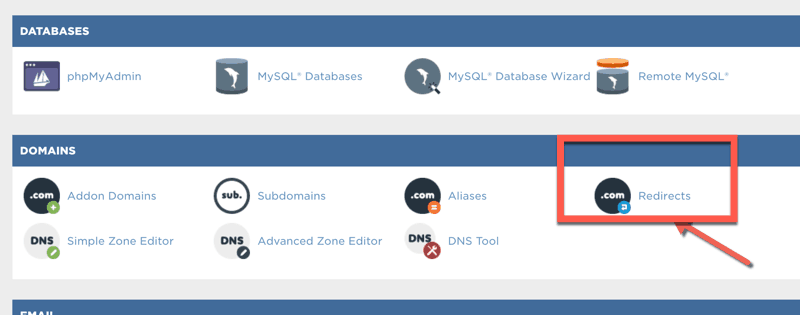
Now, fill in the redirect data.
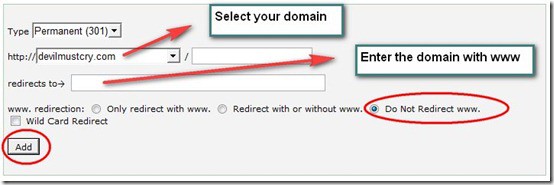
- Select the “Type” option as “Permanent (301)”.
- Select the domain you want to redirect.
- In the “redirects to” box, enter the domain name with “www.”.
- Select redirect method “Do Not Redirect www.”.
- Then press “Add”.
Redirecting A HostGator Domain To Any Other Domain
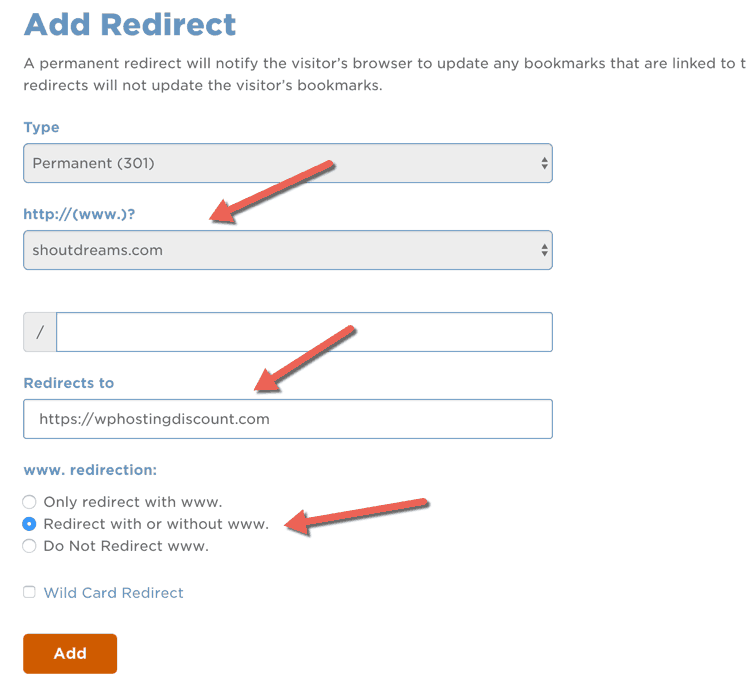
- Select your redirection type. (Most cases are “Permanent (301)”).
- Select the domain to redirect.
- In “redirects to” enter the domain you want to redirect your domain to.
- Select “Redirect with or without www.”.
Redirection Using .htaccess file: HostGator
Using the .htaccess file to give redirections is the best method, but it requires advance editing and technical know-how. Note: The above methods will work just fine.
Redirecting a naked domain to “www.”
- Edit your .htaccess file using notepad and add the following line:
- redirect 301 / http://www.yourdomain.com/
Redirect any web page to any address
- redirect 301 /example.htmlhttp://www.redirecteddomain.com/new.htm
It’s always a good idea to redirect non-“www.” domains to “www.” or vice versa depending on your settings.
Do let us know if you face any problems understanding this HostGator domain redirection guide. You can always use HostGator’s live chat to get support at anytime.
If you like this guide, share it with your friends!
Subscribe
Contents

2 thoughts on “How To Use HostGator Domain Redirect Feature from cPanel”
Hi:
What is simpler for WordPress beginner.
Buy domaine from godaddy ( park it) or wait till I sign up for host gator as I haven’t decided my WordPress theme yet?
(Go daddy / namecheap is cheaper in any event) than using host gator. Do I redirect or give the name to host gator?
Just want simplicity and get it over with
Thanks
Howard
I recently purchased a domain through Hostgator. When I try to transfer it’s not showing up in the ** All Public Domains ** section. What should I do?