

Hostgator is one of the top web hosting for WordPress & I have always recommended Hostgator as one of the best web hostings.
( Read: Hostgator Vs Bluehost Vs Dreamhost ).
In this tutorial, I will be helping you with how to find your Hostgator Name servers detail.
Unlike Dreamhost, Bluehost, Hostgator doesn’t have a default (Static) name servers for all hosting account. You will be assigned different name server when you sign up with Hostgator.

There are two places where you will be able to find Hostgator names servers.
Hostgator Welcome Email:

When you sign up with Hostgator, in the hosting detail Email that you receive after sign up, you can find your name servers.
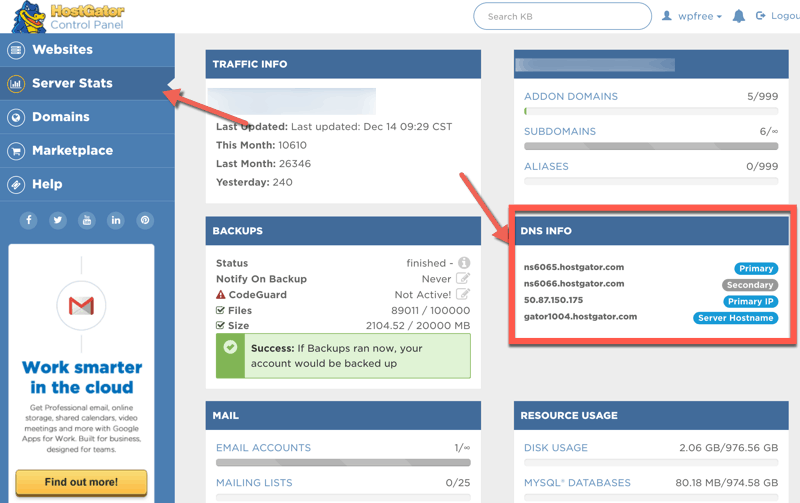
Hostgator cPanel Name Servers:
- Login to your HostGator cPanel
- Click on Server stats on the left-hand side
- On the next page, you will see all the details regarding your Hostgator server including Nameserver details
Do let us know if you have any questions regarding Hostgator hosting or face any issue while changing Hostgator nameservers.
Subscribe
Contents

3 thoughts on “How to Find Hostgator Name Server Details”
Good help for HostGator clients.
It is a really Nice write-up.it helps those who have just started blogging and trying to find some hosting secret.
Thanks for Sharing …
Thank’s Harsh
Hostgator live chat is really very slow
You’ve saved my time